Cypress Neo Reporter
One HTML report for Cypress runs.
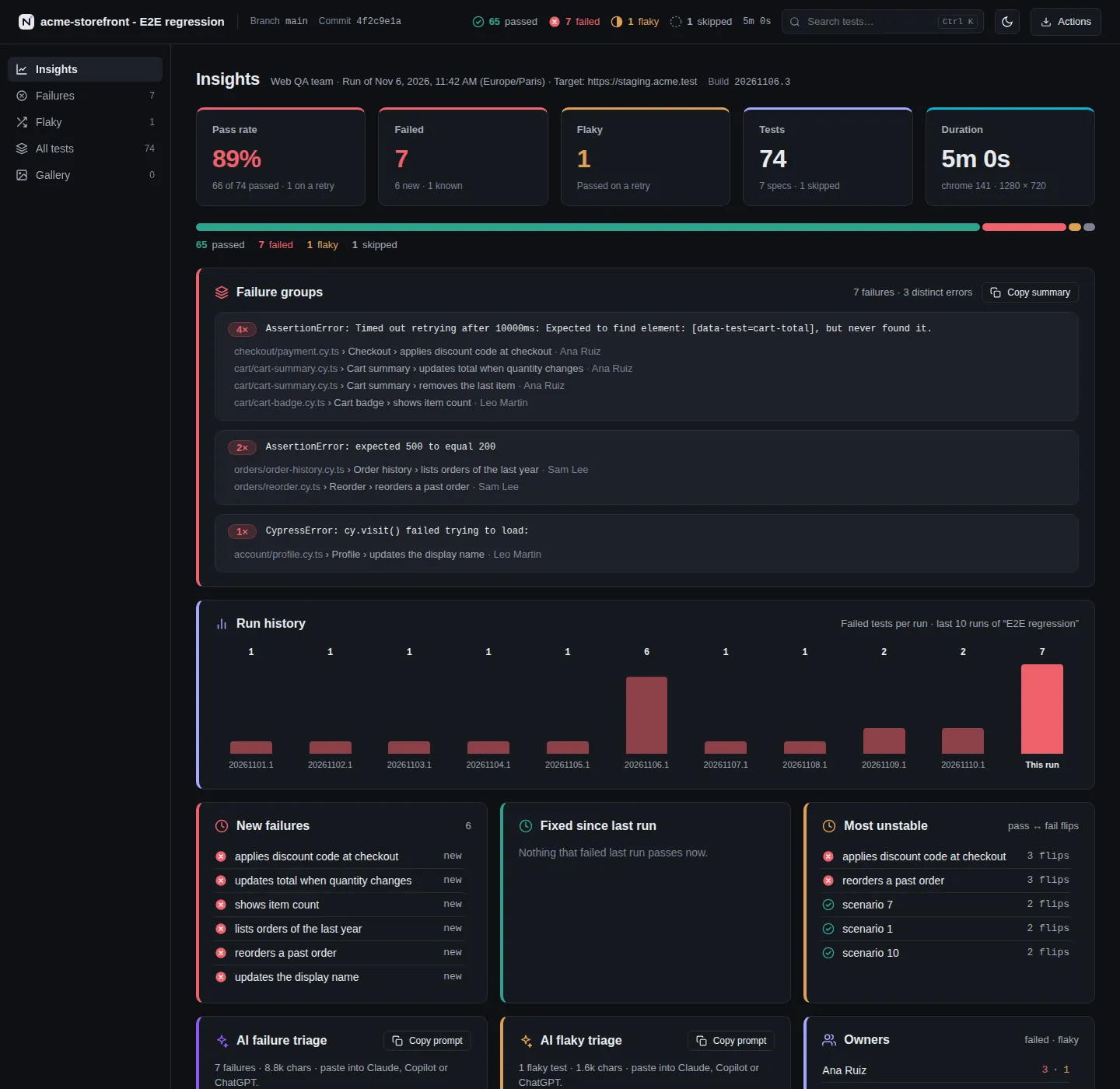
A Cypress plugin that writes one self-contained HTML report at the end of a run. Tests that broke for the same reason are grouped, so one fix closes the group. Each failure is marked new, known or fixed against the last 10 runs, read from Azure DevOps or from a history file kept in the CI cache, and every failed test carries its steps, screenshots, a video clip, failed requests and console errors. The same run writes JSON, JUnit XML and a Markdown summary, and the neo-reporter CLI merges parallel runs, gates the pipeline and posts the result to Slack or Teams. Published on npm in November 2026, MIT, with no runtime dependencies.
How it's put together
A Cypress plugin and support file in TypeScript: the plugin collects the run, the support file records each test, and the report lands in one file.
One file, nothing to host
The report is one HTML file with the screenshots and clips of failed and flaky tests inside, capped by maxEmbedMb (150 MB by default). Open it offline, attach it to a ticket, keep it as a build artifact. A Content-Security-Policy blocks network requests, and the plyr video player is vendored, so the package has no runtime dependencies.
Failures grouped by cause
Tests that broke with the same error sit in one group, so one fix closes the group. Every failed or flaky test gets an AI triage prompt, and so does the whole run: copy it, paste it into any assistant, no API keys. The prompt fences the captured run data and tells the assistant to treat it as data.
History from your CI
Each failure is marked new, known or fixed against the last 10 runs. On Azure Pipelines, history comes from past test runs; on GitHub Actions, GitLab CI or any other CI, from a neo-history.jsonl file kept in the CI cache. History also drives the Most unstable panel, which ranks tests by pass/fail flips, and a Slower than usual panel built from past durations.
Evidence behind every failure
The support file records steps, failed requests (status 500 and up) and console errors for each test. cy.step, cy.addTestContext and cy.businessGoal add your own steps, data and intent. Failed and flaky tests get their screenshots and a video clip cut from the spec video with the ffmpeg build that ships with Cypress, so there is nothing else to install.
Built for the pipeline
JUnit XML keeps the CI test tab working, and a Markdown summary lands on the Azure DevOps run page or the GitHub job summary. Build links come from Azure DevOps, GitHub Actions and GitLab CI. neo-reporter merge joins parallel machines into one report, gate fails the pipeline on new failures or a low pass rate, with a quarantine list, and notify posts to Slack or Microsoft Teams.
Secrets stay out
Masking is on by default: Authorization and cookie headers, bearer tokens, JWTs, passwords in URLs and values of keys such as password, secret, token and api_key become [redacted] in every output, and request URLs lose their query string. includeTestCode: false leaves test code out. Spec and owner names never reach inline JavaScript, and releases go out from GitHub Actions with npm trusted publishing and provenance.
How Cypress Neo Reporter is verified
116 node:test tests in 12 files cover rendering and escaping, history matching, merge, the CLI, masking, option validation and evidence attribution, and run on Node 20, 22 and 24 with strict tsc, publint and Are the Types Wrong on the packed tarball. A second CI job packs the package, installs it into a real Cypress project on Cypress 15 and on 16, and runs a passing, a flaky and a failing spec: the run must end with exactly one failure, write the HTML, JSON, JUnit and Markdown files, embed a test clip, record cy.step and go through neo-reporter merge.
From npm install to a gated pipeline
What happens between adding the package and the pipeline's verdict.
- downloadInstallnpm install --save-dev cypress-neo-reporter; Cypress 15 or 16, Node 20+
- extensionRegister the pluginreturn neoReporter(on, config) in setupNodeEvents, import the support file
- play_arrowRun Cypressnpx cypress run records steps, failed requests and console errors per test
- insightsOpen one reportHTML, JSON, JUnit XML and a Markdown summary in cypress/reports
- ruleGate and notifyneo-reporter gate fails on new failures; notify posts to Slack or Teams
Inside the report
Real reports written by the package: the README captures and the demo report built from its test fixture.